¶ HBQ User Guide
This guide is meant to walk a mission maker through the steps of how to use HBQ and its modules. This guide is not a mission making guide. HBQ is a very simple, but powerful tool.
- Please look at the demo mission made by the mod author if you would like more examples of the HBQ Spawn System in action. The mission can be found in the HBQ mod folder.
Terminology
- HBQ_Spawner: The module that spawns in units. Also has all of the options and settings for the spawn system. These options and settings are set per module.
- HBQ_Spotter: The module for setting a unit or player as a spotter for the HBQ CAS or Artillery modules
- HBQ_CAS: The module for assigning units to be available for CAS fire missions.
- HBQ_Artillery: The module for assigning units to be available for artillery fire missions.
- HBQ_SpawnPosition: Logic Entity that is synced with a HBQ_Spawner. Informs the HBQ_Spanwer where to spawn units that are synced to it.
- HBQ_MovePosition: Logic Entity that is synced with a HBQ_SpawnPosition. Used to move units after they have spawned in. Also, the last HBQ_MovePosition is known as the TargetPosition.
- TargetPosition: The last HBQ_MovePosition in a chain or by itself, the TargetPosition is used by units to perform Task on TargetPosition, which can be changed by double clicking on the HBQ_Spawner Module.
¶ Modes
HBQ works in a few different modes. The mode is determined by what kind of unit or units you sync with the spawn module. There are a total of 9 different modes.
Syncing infantry with the module will make the spawner work in infantry mode.
If you sync infantry and a ground vehicle with the module, the spawner works in transport mode. The synced ground vehicle will transport the infantry to the target position and unload them. If an armed vehicle is synced, it will follow the unloaded troops from a distance.
Syncing only a vehicle, the spawner works in vehicle mode.
If you sync a vehicle and a crate with the module, the module works in transport mode. It is possible to drop off supplies in this mode.
If a plane or helicopter is synced with the spawner, it works in aircraft mode.
If you sync a plane or helicopter and an infantry group with the module, the spawner works in air troop transport mode. It is possible to have troops parachute in or have helicopters land troops in this mode.
Syncing a plane or helicopter and a crate or box with the module makes the spawner work in air cargo transport mode.
Synchronizing a boat or ship with the module makes the spawner work in Naval mode.
Synchronizing a boat or ship and infantry with the module makes the spawner work in Naval Troop Transport Mode.
¶ Basic Setup
The basic setup requires the HBQ_Spawner module and the desired unit you wish to spawn. Synchronize the module to the desired unit. You now have the most simple form of spawning in a unit.
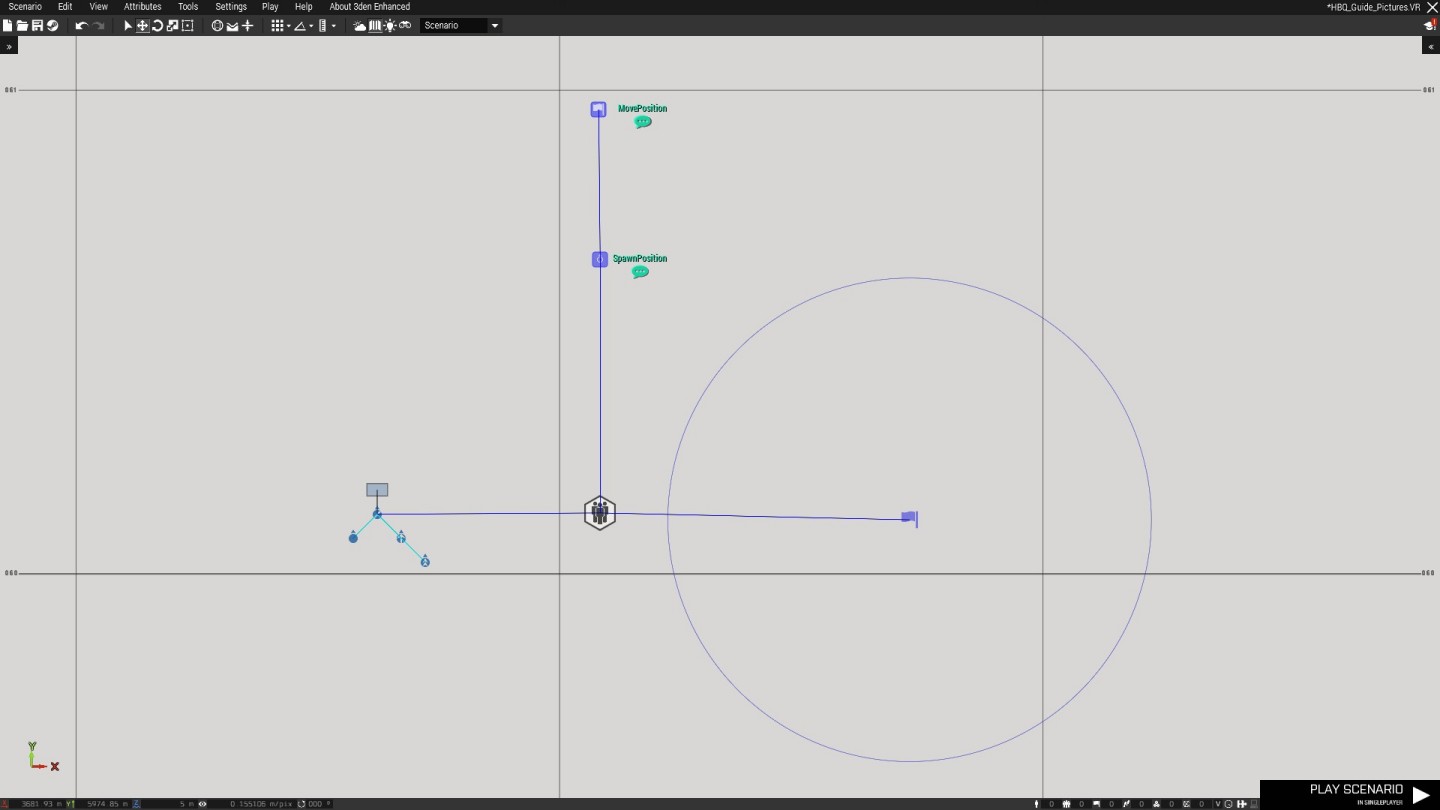
We can make this system more useful for us by adding in a SpawnPosition and a MovePosition. The SpawnPosition is where the synced unit will spawn, and the moveposition is where said unit will move to after spawning in. You can sync several MovePositions together to create a path. The last MovePosition is known as the TargetPosition. We can also trigger the spawner with a trigger.
It is important to know that you MUST sync MovePositions in the order that you placed them.
¶ Multiple Spawn Locations
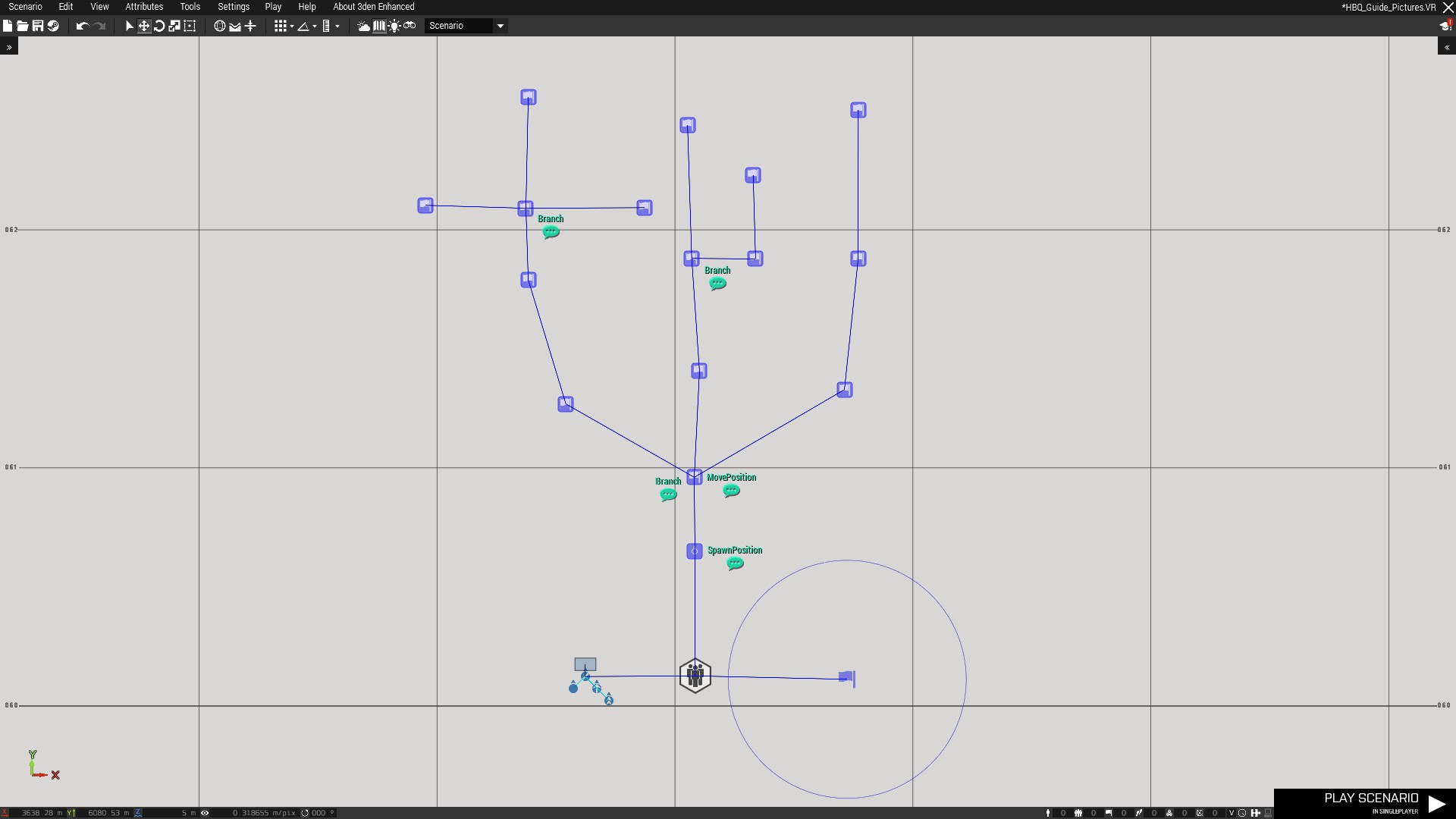
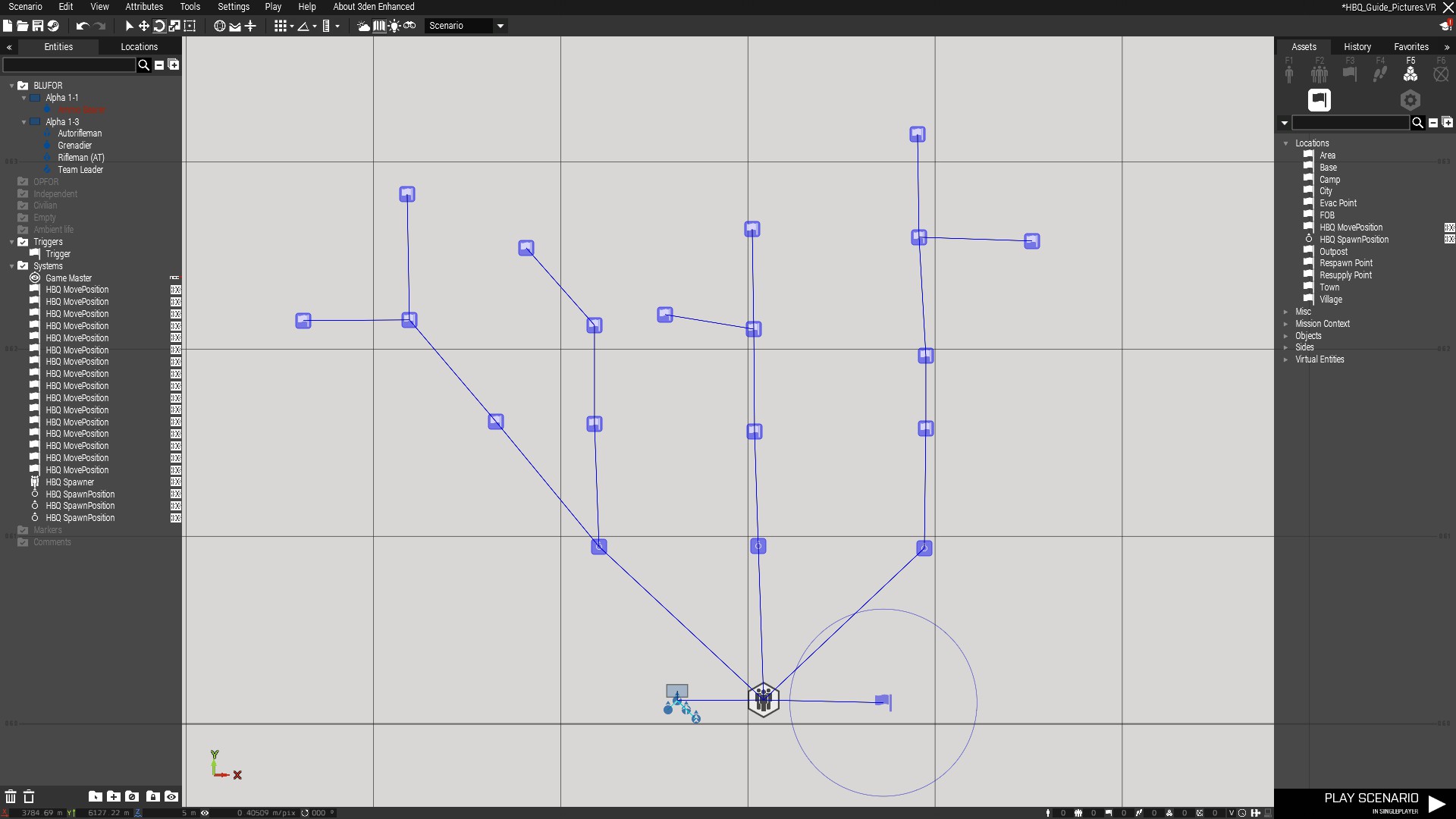
You can sync as many SpawnPositions as you would like to a HBQ_Spawner. A unit will be spawned at each synchronized SpawnPosition. Different Complex Paths can be assigned to each spawn location.
¶ Simple Patrol Setups
¶ Looping
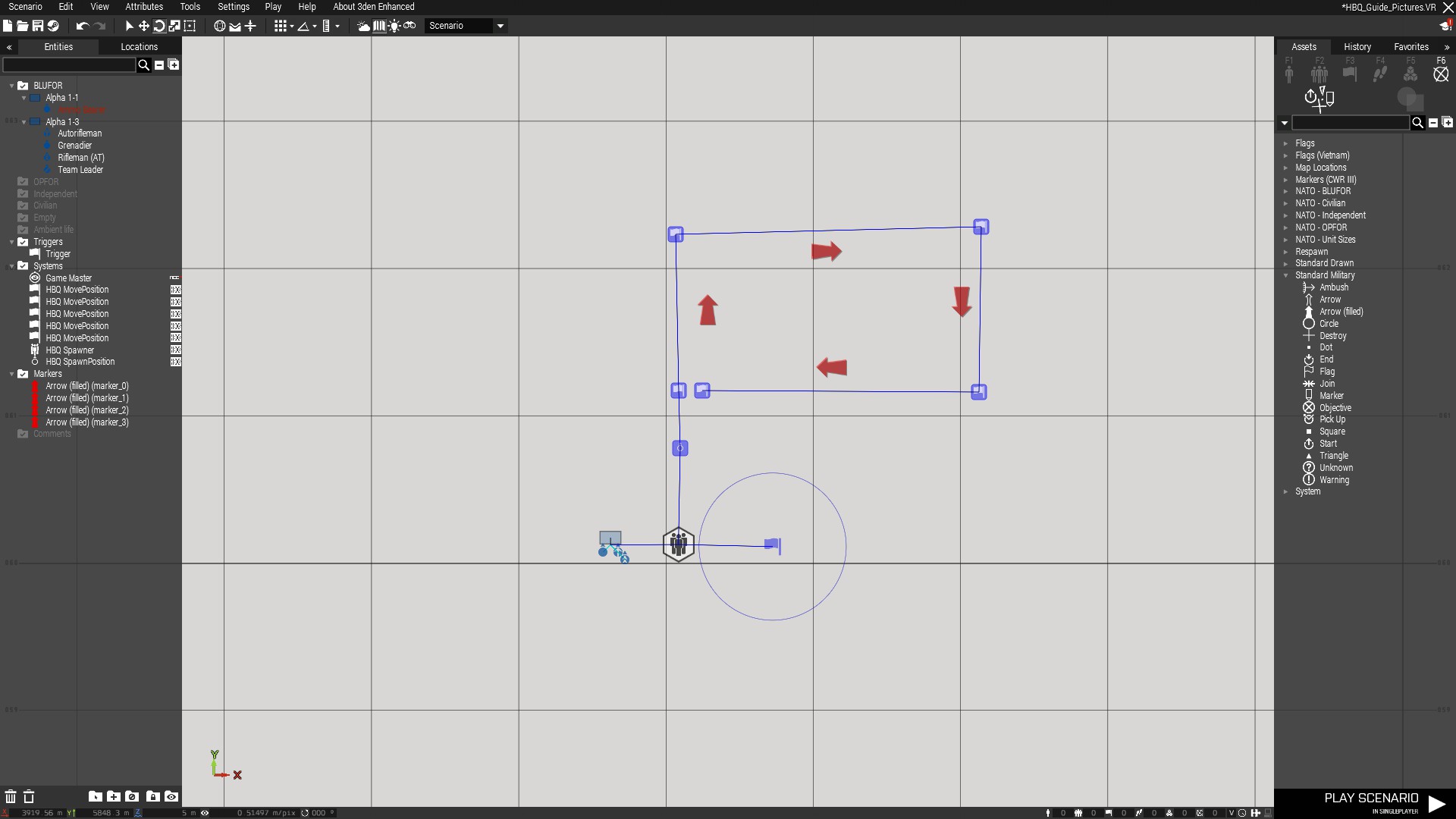
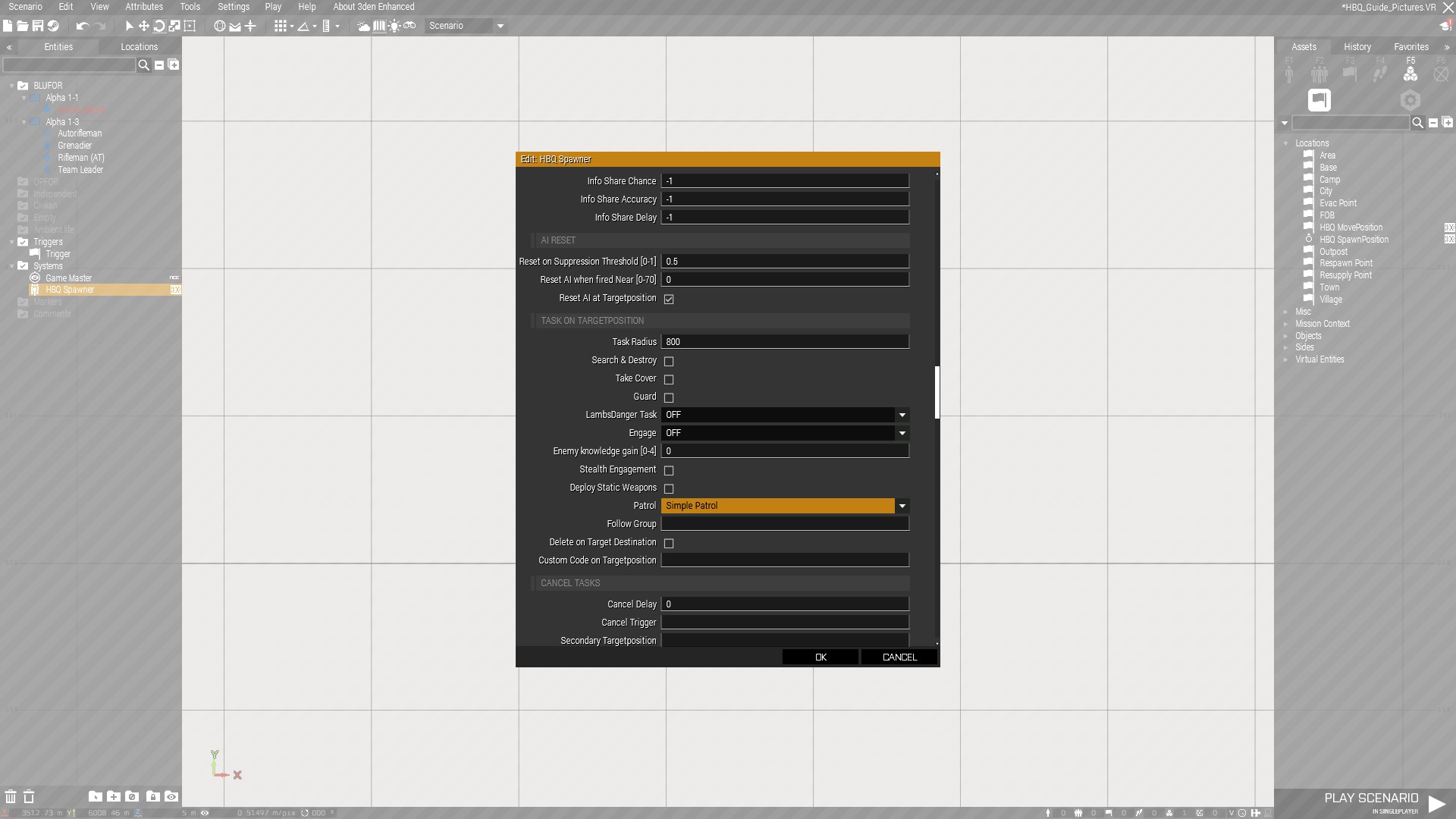
To make a unit perform a simple looping patrol, you first need to place down your MovePositions. Make sure the first and last MovePosition are close to each other to make the unit move in a loop. Next, go into the options inside the HBQ_Spawner that is synced with the unit and choose simple patrol under “Task on TargetPosition”.
¶ Ping Pong
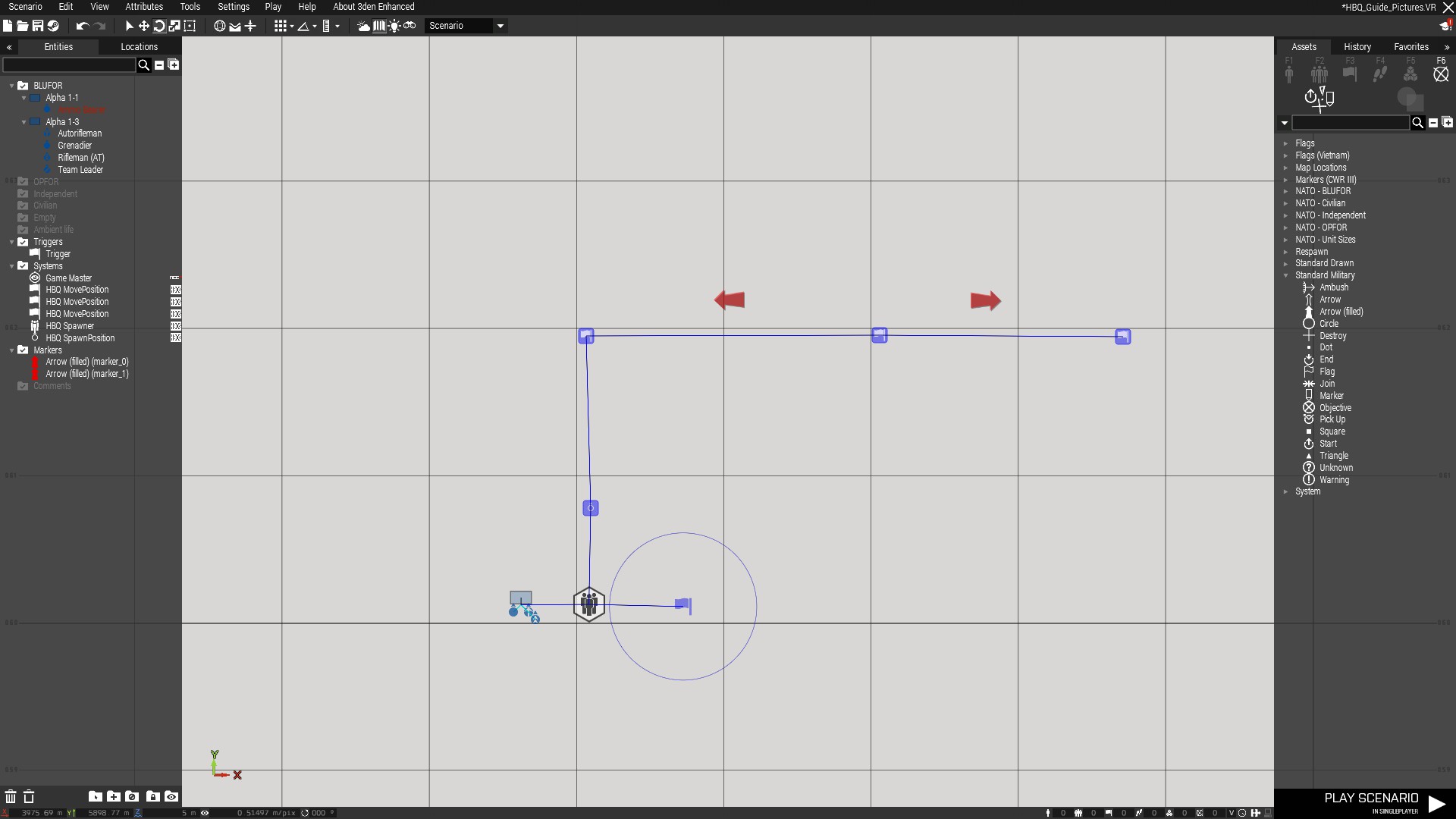
If you don’t place the first and last MovePosition close to each other, units will move along the path in a ping pong style.
¶ SAC System
The SAC system, or Spotter, Artillery, and CAS system allows you to assign units as Spotters, Artillery, or CAS.
¶ HBQ_Spotter
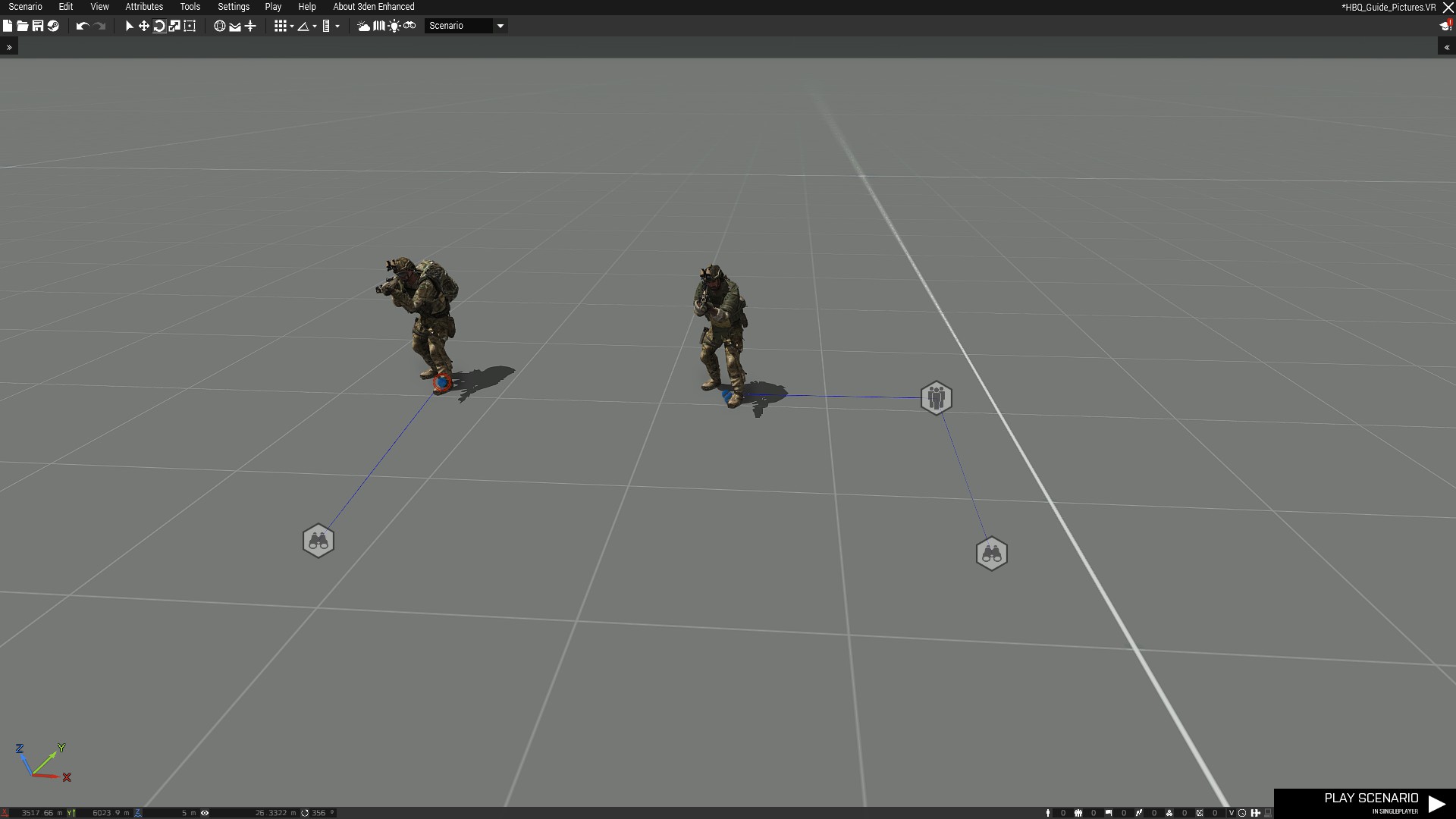
Players or AI can be assigned as Spotters. You assign spotters by syncing a unit to the HBQ_Spotter module. You can also sync the module to a HBQ_Spawner. This will cause all units or groups spawned with this module to become a spotter. A spotter can request CAS or Artillery missions if there are any available units in radio range. There are a number of options in the HBQ_Spotter module that allow you to adjust how and when a spotter can request missions. If a player is the spotter, the player has a scroll wheel menu option to call in CAS and or Artillery. The player must have binoculars and aim at the target. With AI spotters, it is recommended to set the unit to Stealth, and set the hold fire distance in the HBQ_Spawner module to something like 25-100.
¶ HBQ_Artillery
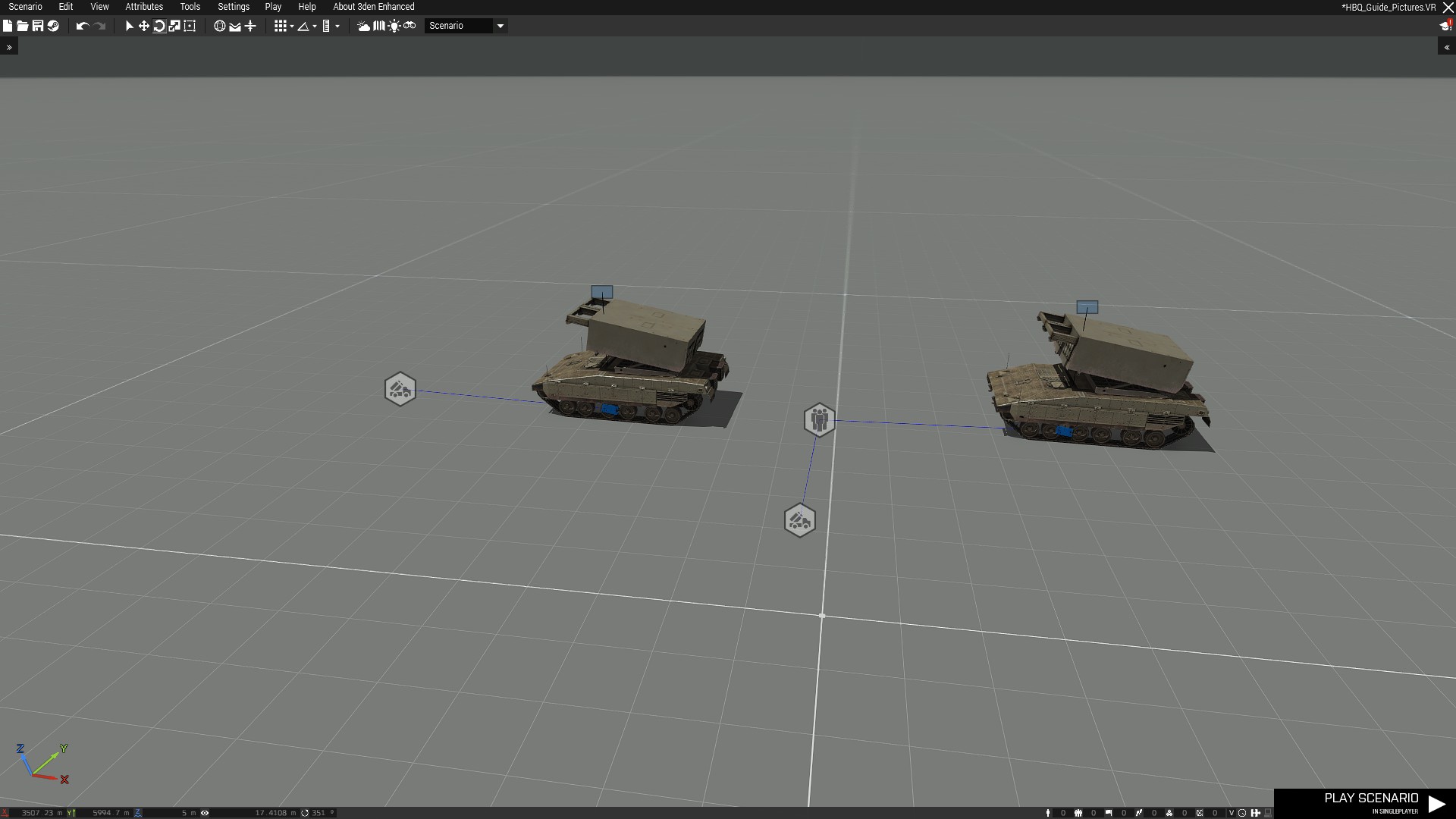
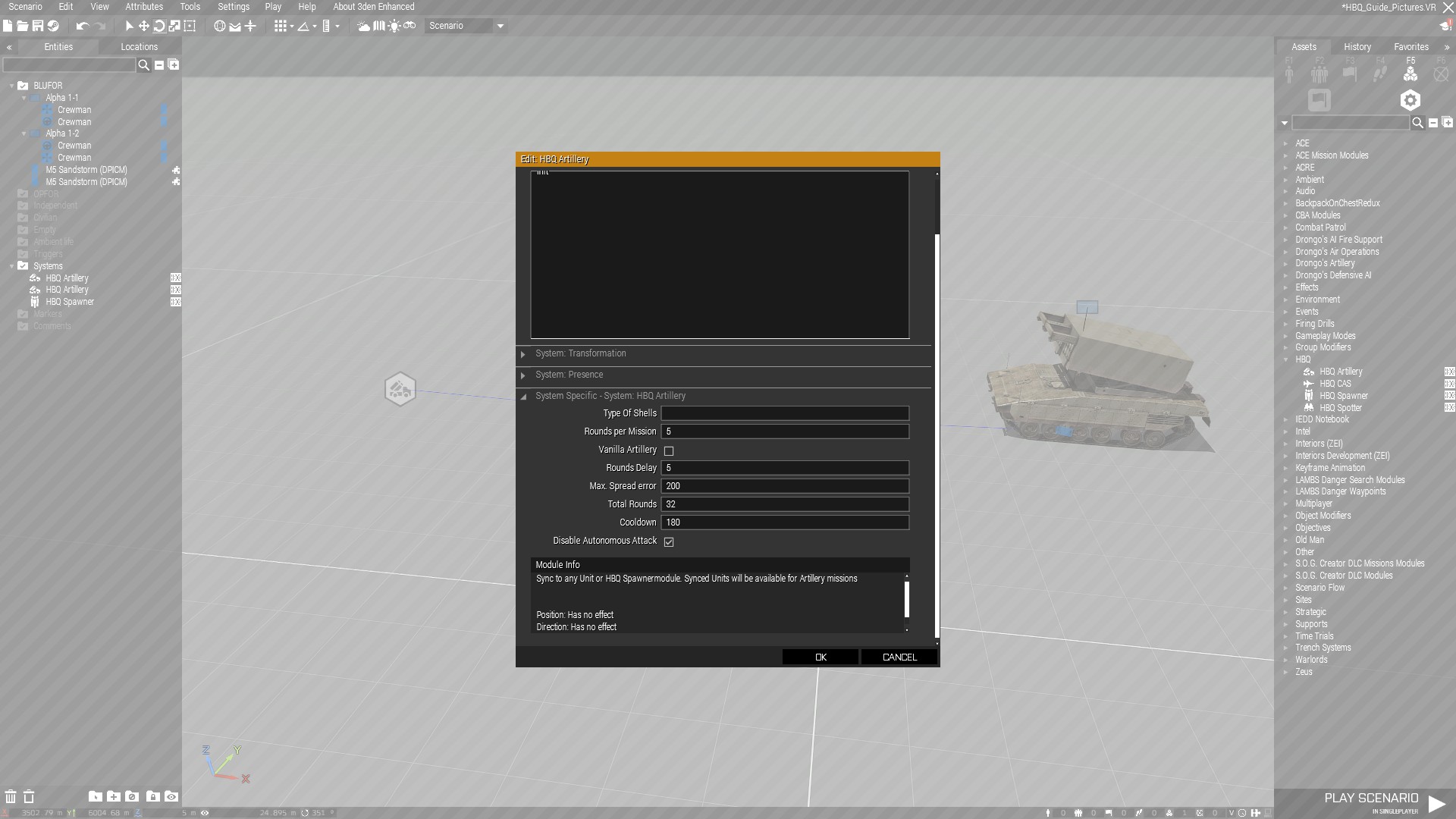
In order to have Artillery assets available, you need to assign a unit to be available for artillery fire missions. Sync a HBQ_Artillery module to a unit or to a HBQ_Spawner module. Any artillery unit or mortar group works with this. You can also make units mobile with the deploy static weapon feature. The options for this module include what type of shells can be used and how many rounds per mission, as well as delay, max spread, total rounds, cooldown, and disable autonomous attack.
¶ HBQ_CAS
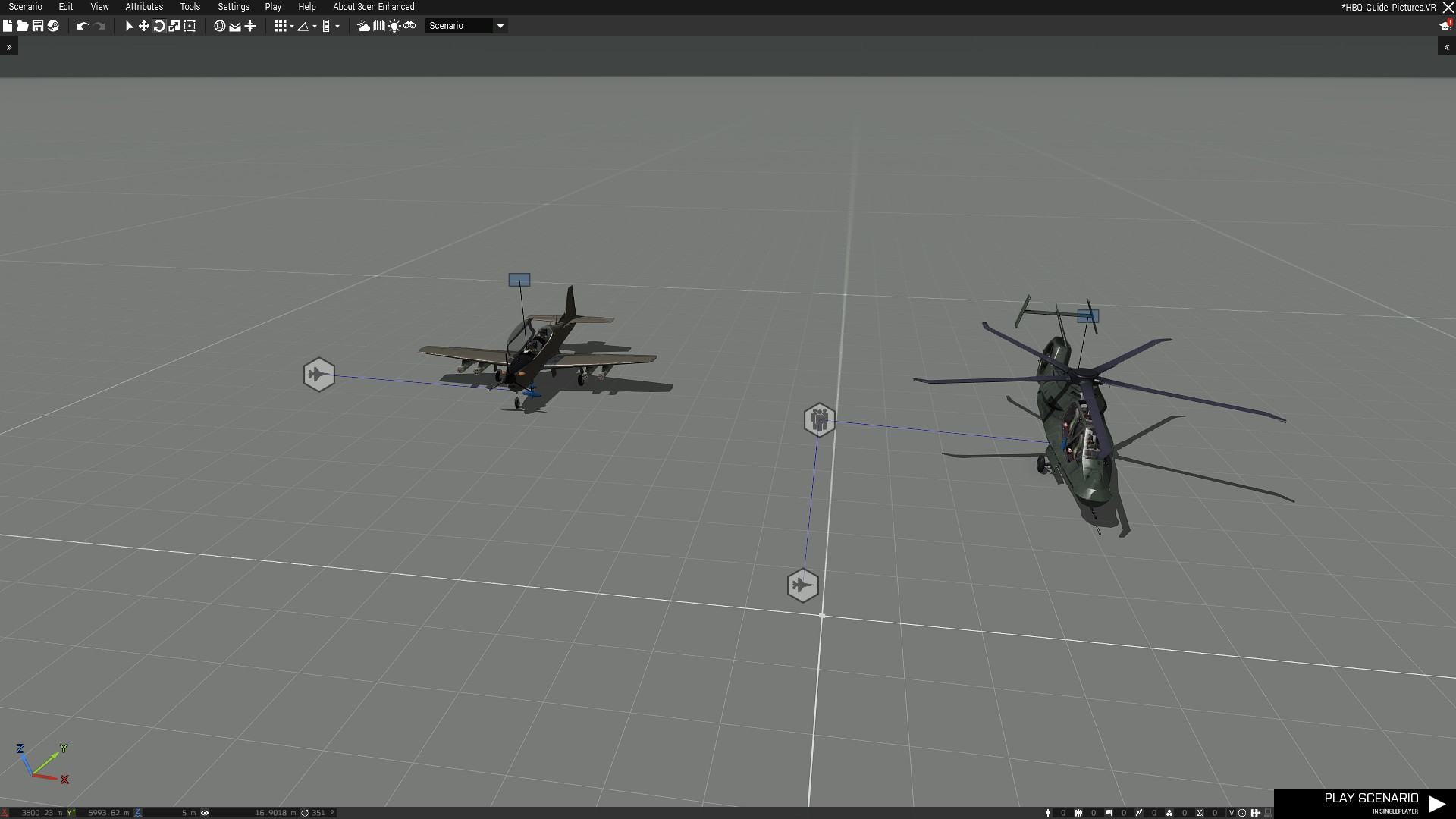
In order to have CAS assets available, you need to assign a unit to be available for CAS fire missions. Sync a HBQ_CAS module to a unit or to a HBQ_Spawner module. Options include attack distance, search distance, fly altitude, max mission time, pylon use, missiles per mission, total missile count, missiles delay, missile precision, cooldown, and disable autonomous attack.
¶ Spawner Module Options
There are quite a lot of options in the HBQ_Spawner Module. All options have tooltips that explain what they are. They are broken out into 23 categories. While I will not write out each and every one, I've included ones that I think are very useful to know.
¶ Spawn Settings
- Enable: Leave on if you wish to use the module.
- Trigger Condition: Condition that starts the spawn module. Code needs to return true or false (eg. !alive car) Leave blank if only a trigger should start the module.
- Initial Delay: Delay in seconds before first spawn happens.
- Unit Budget: How many units the module will spawn at most. If spawning vehicles, the budget will count crew members. 0 = no budget limit.
- Repeating Cooldown: minimum time until a repeated triggering can happen. Triggers need to be set to be repeatable. 0 = disabled.
- Groups Spawn Delay: Delay in seconds after each group spawns.
- Trigger Radius: Creates a trigger around each SpawnPosition that will trigger that SpawnPosition’s spawn. Does not get triggered by pilots. 0 = disabled.
- Random Spawn Radius: Units will be spawned within this radius around the SpawnPosition. A safe place for spawning will be used, this helps prevent vehicles exploding when spawned to close to an obstacle. 0 = disabled
- Spawn Probability: A probability scale for if the spawn will actually happen or not when Automatic Difficulty Scaling is enabled. 1 means all spawns will happen (scaled by Automatic Difficulty Scaling). If set to 0.5 the probability that a spawn will happen on each SpawnPosition is 50%. If set to a value greater than 1, spawns will happen no mather what, even with Automatic Difficulty Scaling enabled.
- Force Side: Units will spawn as the side you choose here. By default, units will spawn with their original side. Does not work with Optimized SpawnMethod.
- Return to Base: Groups will return to the SpawnPosition after completing thor Task. This can be Transporters after unloading or when groups have reached their TargetPosition (after Cancel Delay)
¶ Player Security Radius
- Spawn Security Radius: Units will not be spawned in when a Player is within this distance to the SpawnPosition. When NO player is near the SpawnPosition, the spawn(s) will continue. -1 = use CBA Setting, 0 = Disable.
- Despawn Security Radius: No groups will be deleted when a Player is within this distance to the GroupLeader. When NO Player is near the GroupLeader Position anymore, the groups can despawn when LifeTime expired. (-1 = Use CBA Settings, 0 = Disabled)
- Check Players Watch Direction: Check if any Player is looking at the SpawnPosition. When NO Player is looking at the SpawnPosition, the Security Radius is divided by 2.
Include Pilots: Includes pilots for any Near Player Checks.
¶ Group Settings
- Group Size: [min,max] size of each spawned group (random number between min and max). You can also use a single number (eg. 6). -1 = Groups will spawn with their original size.
- Single Group: If enabled, all Units will spawn into one single Group. This is especially useful when spawning many single static Units in different locations without producing many small Groups.
- Custom Loadouts: If enabled, Units will spawn with custom loadouts. Disable if not needed to get slightly better performance when groups spawns.
- Stay Near Leader: This option must also be enabled in CBA Settings. TIGHT = Group members stay in formation. MEDIUM = Group members have some freedom of movement. LOOSE = Group members can move even further away from team leader.
- Spawn in Formation: If enabled, Units will spawn in formation. Disable if you want to spawn groups in tight spaces like buildings.
¶ Skill Settings
- Skill Multiplier: 1 = no change, 0.5 = half skill, 2 = double skill
- Close Combat Skill Multiplier: Multiplier for skills when Units are near Players (within 50 meters)
- Hearing Distance: Units hear shots from Players in this Distance. The closer the shots, the more knowledge Units will gain about the Player. For shots with silencers, this distance is divided by 4. 1 = use CBA Setting, 0 = Disable.
- Courage Overwrite: Overwrite HBQ Courage setting for these groups. [0-1]. -1 = don’t overwrite courage.
- Aiming Overwrite: Overwrite aiming skill setting for these groups. [0-1]. -1 = don’t overwrite aiming skill.
- Visibility: [0.1-4] Camouflage coefficient of spawned units. 0.1 = units will not be seen as well by AI. 4 = Units are visible from far away.
¶ Engage
- Engage Radius: Engagement will start as soon as an enemy is in range of the set value (Meters). Transports will disembark and engage. Paradrops will drop and engage. Static AI will also engage. (-1 = use CBA settings. 0 = disabled)
- Engage Radius Variation: Random Value added to Engage Radius (-1 = Use CBA setting)
- Engage Threshold: Only engage when number of enemies within Engage Radius is above this threshold (-1 = Use CBA settings)
- Tactic: HIGHGROUND = Groups try to engage from a high position. LOWGROUND = Engage from low ground. FOREST = Engage from forest. URBAN = Engage from urban areas. DIRECT = duh. FLANK = Group will flank enemies. RANDOM = random.
- Knowledge Required: Groups will only engage when they have knowledge about at least one enemy within the Engage Radius set above. (Knowledge needs to be above 1.5)
- Enemy Knowledge Gain: Knowledge Units will have about enemies they engage. 0 = Groups will move faster to enemies, 4 = Full Knowledge. Groups will move slowly and attack from far distance.
- Stealth Engagement: Groups engage stealthy and will not attack until very close to enemies.
¶ Assault Speed
- Assault Speed: [0-1] Groups assault the TargetPosition not paying much attention to other fights around them. The higher the assault speed, the faster the group moves to the TargetPosition. The lower the value, the more Units react to fire. (Works with Engagement and with move to Area) (0 = Assault Mode disabled)
- Assault Completion Threshold: At this distance from the TargetPosition, the assault mode will be reset and the Group will behave normal again.
- Only when Engaging: When enabled, Assault Speed will only be used when an engagement is started. If disabled, Assault Speed will be used always.
¶ Automatic Spawn Positions
These Settings only apply when no HBQ_SpawnPosition is synced to the Module
- Groups Count: [min,max] Amount of Groups that get spawned when no SpawnPosition is synced and Automatic SpawnPosition is active. Can also be a single digit number. (Might be overwritten by groups per Wave setting.)
- Spawn Center: Name of an Object/Player (VariableName you set in the Init Section). The center or Automatic SpawnPosition (if left blank the module is SpawnCenter). If you enter the name of a Player, spawns will happen around the Player.
- Spawn Distance from Module: [min,max] Groups are spawned at this distance from the SpawnModule/ SpawnCenter when no SpawnPositions are synced to the Module. The orientation of the Module/SpawnCenter plays a role. Spawns happen only at safe positions on land.
- Cone Angle: Angle at which Groups are spawned (See debug Lines on Map). The Orientation of the Module Plays a role. Allows you to define the direction from which the Groups come.
- Spawn in Buildings: Automatic SpawnPositions preferably spawn in buildings, in forest, or near rocks if there are no buildings to be found. Used to prevent Players from seeing spawns in an open field, or to occupy buildings (enable Static AI). Only works for Infantry.
¶ Move/Follow
-
Move to Areas/Follow Objects: You can enter area Markername(s), Objectname(s) or Groupname(s) (separated with commas). Spawned units will move to the closest Area/Object/Group and stay there until another Area/Object/Group is triggered. Can be canceled with Task Cancel Trigger
-
Area Triggers: you can enter Triggernames (separated with commas). The amount and order of Triggers need to match the amount and order of Areas/Objects/Groups you entered above. The Trigger(s) will enable the Area(s) defined above. If you leave it blank, units will move to the closest Area.
-
Move to latest Activated Area: If enabled Groups will move to the latest Activated Area. if disabled and more than one Area is activated, groups will stay in the active Area they are still in.
¶ WaveSettings
-
Enable Wave Spawning: spawn units in waves.
-
Groups per Wave: [min,max] Number of spawned groups per wave (random number between min and max). Can also be a single digit.
-
Wave Delay: [min,mid,max] Delay in seconds after each wave. You can optionally enter 3 values separated with commas to randomize the delay.
-
Wave Count: [min,max] How many waves should spawn in total. 0= infinite
-
Wave stop trigger: name of the trigger that stops waves or any spawns from this module.
-
Wave Spawn Duration: Stop wave spawning after this time (seconds) 0 = infinite
¶ AI Behaviours
-
Static AI: Spawned units can not move until one of these reset conditions is me; Static reset delay, suppression, fired near, engagement, secondary targetposition.
-
Static Reset Delay: after this time, units proceed moving 0= disabled
-
Ignore Enemies: Turns off the ability to get in fights with enemies. Can be reset by this criteria: Suppression, near shots, targetpos reached
-
Hold Fire Distance: Open fire when enemy is within this range (meters). 0 = disabled
-
Hold Fire Time: When a Group gains Knowledge of an enemy, the attack will be delayed by this time (seconds). 0= disabled
-
Keep Stance: Units keep their stance and don’t go prone when in danger.Suppression Threshold will be considered when you enable reset AI on Suppression. If a Unit is suppressed more than the threshold, it will change stance again.
-
Shut Up!: If enabled, Spawned units don’t talk.
-
Rearm Distance: Distance Units will look for ammo (crates, corpses, arsenals, vehicles) if they are low on ammo. Very performance heavy. (-1 = Use CBA Setting, 0 = disable)
-
Use Gun Attachments: Groups will dynamically use gun attachments depending on combat mode and daylight. (In combat: IR lasers. In other modes, gun lights)
¶ AI Reset
- Reset on Suppression Threshold [0-1]: When a Unit gets suppressed more than this, all AI features are enabled that have been disabled by other options like Static AI or Ignore Enemies. 0.1 means very little suppression is needed. 1 means full suppression is needed for reset. 0 = disabled.
- Reset AI when Fired Near [0-70]: When Units hear shots fired in this distance (max 70 meters) all AI features are enabled that have been disabled by other options like Static AI or Ignore Enemies. 0 = disabled.
- Reset AI at TargetPosition: When Units reach their TargetPositon, all AI Features are enabled that have been disabled by other options.
¶ Task on TargetPosition
- Task Radius: Radius for Task
- Search & Destroy: If enabled, Groups will search the area around the TargetPosition for a while before going into an idle state.
- Take Cover: Groups move to their TargetPosition and take cover. If there is no cover near the Group, they will go prone in a line formation. The Group holds the position until Task Delay is over.
- Guard: Groups hold the position around the TargetPosition. The Task Radius defines the size of the Guard area (until Task Delay is over). If the task Radius is smaller than 10, groups go in a 360 formation.
- LambsDanger Task: LambsDanger Task executed at TargetPosition. Task Radius is considered for all Lambs Task. Off, Garrison, Garrison Teleport, CQB, Rush, Hunt, Patrol, Camp, Assault, Creep
- Engage: Groups will engage enemies (within Task Radius) when reaching the TargetPosition. Sets in what manner the AI will attack. Options are Direct, Forest, Lowground, Highground, Urban, Flank, Random.
- Enemy Knowledge Gain [0-4]: Amount of knowledge groups will gain when they arrive at TargetPosition. 0 = Groups move faster to enemies. 4 = Full knowledge, Groups will move slowly and attack from far distances.
- Stealth Engagement: Groups engage stealthily and don’t attack until very close to enemies.
- Deploy Static Weapons: Spawned Groups will deploy static weapons on TargetPosition.
- Patrol: Simple Patrol = Groups cycle on their path. Random Patrol= on TargetPositon, random waypoints are generated.
- Follow Group: if you enter the name of a Group (VariableName), spawned Groups will follow this (VariableName) Group after reaching the TargetPosition. If you enter the name of a HBQ_Spawner Module, the Group will follow the nearest Group that was spawned by the spawner.
- Delete on Target Destination: When the Groups reach their TargetPosition, Units will despawn. (Despawn Security Radius is considered.)
- Custom Code on TargetPosition: Code that gets executed when a Group reaches the TargetPosition. (‘this’ refers to the Groupleader. ‘Thislist’ refers to an Array with all GroupMembers. The code will be executed on all clients.)
¶ Cancel Task
- Cancel Delay: After this time (seconds), the Task is Cancled. Starts counting down after reaching the Target Position. Groups proceed with Return to Base or move to Secondary TargetPositon. (0 = never cancel)
- Cancel Trigger: Name of a Trigger that cancels the Current Task and Groups proceed with Return to Base or move to Secondary TargetPositon.
- Secondary TargetPosition: name of an Object where Groups should move to after the current Task is canceled by Cancel Delay or CancelTrigger. If you enter the name of a Group, Spawned Groups will follow this Group.
- Flee to Secondary TargetPosition: If enabled, Groups will stop fighting and flee to the secondary TargetPosition after the current Task is canceled by Cancel Delay or Trigger. Units get deleted when reaching the secondary TargetPositon.
¶ Vehicles
- Vehicle Speed Limit: Limit speed of spawned Vehicles. Limit gets reset when Vehicle is fired at. (-1 = no limit)
- Convoy Separation: (Meters) Set this value if you want to create a convoy with separation. You need to sync Vehicles in the order the convoy should be. The first vehicle will be the lead vehicle. Sync a SpawnPosition for each Vehicle.
- Spawn on Ground: If you use Planes of Helis, this parameter will spawn them on the ground. If set to false, the Plane/Heli will spawn at fly altitude.
- Fly Altitude: Fly altitude of Plane or Heli.
- Combat Landing: Helicopters will land quicker with a lower profile.
- Loiter Radius: Sets the Loiter Radius on the Last Waypoint. 0 = Loitering Disabled
- Paradrop: If you have TroopTranspot with Heli or Planes, troops will papadrop instead of disembarking on the group.
- Parachute open Altitude: (I think this is in meters I really don’t know) Altitude at which parachutes open.
- Vehicle Locked: Spawned Vehicles are locked. Units will not disembark when under fire. Vehicles can not be hijacked. Cargo can not be unloaded.
- Vehicle Crewed: If disabled, vehicles will spawn without crew.
- Fast Disembark: If enabled, troops will disembark quickly.
- Custom Vehicle Loadout: If enabled, the vehicle will spawn with custom items you’ve added. This setting also works for cargo items.
- Infinite Ammo: If enabled, vehicle ammunition will never deplete.
- Engine Fuel Consumption: [0-1] How much fule the vehicle consumes. 0 = ARMA default. If you set it to 1, the vehicle will run out of fuel very quickly.
- DCO VehicleFSM: Use DCO VehicleFSM (is ignored if not loaded)
¶ Balancing
Spawns are paused until criteria below are met. Balancing only works with Waves enabled.
- Enable Balancing: When enabled, the module creates a Hot Zone at the ModulePosition and pauses spawning until certain criteria are met.
- Only Consider the Module: if enabled, only units spawned by this Module are considered for Balancing (friendlies). Enemies from other modules and Players are still considered. You can use this option to keep a certain amount of units of a type in an area for example, by using the Maximum Friendlies option.
- Balancing [0-10]: A value of 1 means that the amount of friendlies and enemies will b ebalanced. The higher the value, the more Units this module will spawn. 0.5 means that enemy forces will be stronger in the Zone. (0 = disabled)
- Zone Radius: Radius around the Module that refines the zone (zone has infinite height). All Units in the zone are considered for balancing. If you use a Unit/Vehicle/Group as SpawnCenter in AutomaticSpawnPosition settings, the zone will be around the SpawnCenter object and move with it.
- Zone Trigger: Enter the name of a Trigger. The volume of the trigger will be used instead of the Zone Radius.
- Minimum Enemies: Only spawn when more enemies are in the zone. 0 means that no enemies need to be in the zone to start spawning.
- Maximum Friendlies: Only spawn if less friendlies are in the zone. 50 means that spawn pauses until less than 50 friendlies are in the zone. (0 = disabled)
- Max Injured Enemies: Only spawn when there is less damaged/unconscious hostile infantry in the zone. Can prevent being overrun when there is a lot of unconscious enemies.
- Max Damaged Enemy Vehicles: Only spawn when there is less damaged hostile vehicles in the zone. Can prevent being overrun when there is a lot of damaged vehicles.
¶ Civilian AI Features
These settings only apply if Side is CIVILIAN
- Hide Chance: [0-1] probability that civilian units are hiding in buildings when guns are shot near them. After they reach the building, they get deleted.
- Rebel Probability (Fired Near): [0-1] Probability that civilians will become hostile and take a rifle out when guns are shot near them.
- Rebel Probability (Player Near): [0-1] Probability that civilians will become hostile and take a rifle out when a Player is near. (probability is checked every 10 seconds)
- Rebel Weapon Class: The weapon the rebel draws
- Rebel Magazine Class: the ammo rebel draws.